
Tech
Apple CarPlay Wireless Adapter – Effortless Setup, Seamless Experience

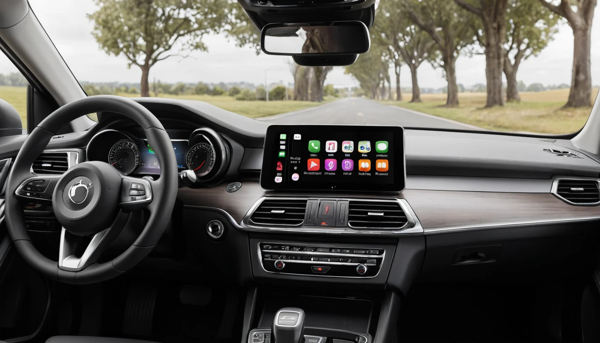
Apple CarPlay wireless adapter makes driving easier. Learn how it works, key features, and why it’s a must-have for modern drivers.
What Is Apple CarPlay Wireless Adapter? Unlock Seamless Driving 🔌🚗
Ever wished your iPhone could connect to your car without wires?
You’re not alone. Imagine this: You hop in your car, your favorite playlist kicks in, directions pop up on your screen, and all this happens without touching a single cable. That’s the magic of an Apple CarPlay wireless adapter.
Whether you’re tired of tangled wires or just want a smoother tech experience on the road, you’re about to discover a game-changer. Let’s break it all down in plain English. 😉
🚘 What Is an Apple CarPlay Wireless Adapter?
An Apple CarPlay wireless adapter is a small device—usually a dongle—that plugs into your car’s USB port. It transforms wired CarPlay into wireless CarPlay, allowing your iPhone to connect via Bluetooth and Wi-Fi instead of a cable.
In simple terms:
- You plug the adapter into your car
- Your phone connects wirelessly
- CarPlay works like normal, just without wires
No more fumbling with cords every time you drive.
🔧 How Does It Work?
The adapter bridges your iPhone and your car’s infotainment system. It uses:
- Bluetooth to initiate the connection
- Wi-Fi to maintain a fast, stable connection
- Your car’s USB port as the power and data source
Here’s a quick flow:
- Plug in the adapter
- Turn on your car
- Pair your iPhone once via Bluetooth
- Boom—CarPlay is now wireless every time
📱 Why Go Wireless with CarPlay?
You might be wondering: Is wireless really better? Yes—and here’s why:
- Freedom from cables 🧵
- Automatic connection when you enter the car
- Cleaner dashboard and fewer distractions
- Use your phone freely after parking
It’s all about convenience, safety, and a better driving experience.
🧩 Compatible Cars and Requirements
Not every car supports wireless CarPlay out of the box. That’s where the adapter comes in.
You need:
- A car that already supports wired CarPlay
- An iPhone 5 or later running iOS 9+
- A USB port in your car
- A reliable wireless CarPlay adapter
🛠️ Setup: Easy as Plug-and-Play
No tech degree needed! Most adapters follow a similar setup process:
Step-by-step:
- Plug adapter into USB port
- Turn on vehicle
- Pair iPhone via Bluetooth
- Accept prompts on both screens
- Enjoy wireless CarPlay 🎉
Pro tip: Some adapters have their own interface—just follow the on-screen guide.
🧪 Features to Look For in a Good Adapter
Not all adapters are made equal. When shopping, keep an eye out for:
- Fast auto-connect
- Low latency for smooth audio/video
- Firmware updates via app
- Universal compatibility
- Compact size
📊 Adapter Comparison Table
| Feature | Budget Adapter 💵 | Mid-Range Adapter 💼 | Premium Adapter 💎 |
|---|---|---|---|
| Auto-Connect Speed | Moderate | Fast | Ultra-fast |
| Audio/Video Lag | Noticeable | Minimal | Barely there |
| Firmware Updates | Rare | Occasional | Frequent |
| Car Compatibility | Limited | Broad | Extensive |
| Price Range | $30–$50 | $60–$90 | $100–$150 |
🔄 Wired vs Wireless CarPlay: Key Differences
Here’s a quick rundown:
- Wired CarPlay
- Needs a cable
- Stable connection
- Charges your phone
- Wireless CarPlay
- No cable needed
- Connects automatically
- May drain battery (use wireless charging pad)
🎯 Benefits of Using a Wireless Adapter
Let’s summarize what makes wireless CarPlay so appealing:
- Hands-free driving
- No need to plug/unplug your phone
- Cleaner car interior
- Better accessibility when multitasking
It’s modern, sleek, and convenient. 😎
⛔️ Common Issues (And Fixes)
Even the best tech can glitch. Some common hiccups include:
- Connection drops
- Restart the adapter or update firmware
- Laggy audio
- Reduce Bluetooth interference
- Incompatibility
- Check the adapter’s supported models
Most issues can be fixed with updates or re-pairing.
🧼 Maintenance Tips for Your Adapter
Keep it running smoothly:
- Don’t expose it to extreme heat
- Regularly check for firmware updates
- Use only certified USB cables if needed
Treat it like any tech—care is key.
📦 Top Brands to Consider
Want a reliable adapter? Some trusted names include:
- CarlinKit 🔥
- OTTOCAST
- Binize
- MA1 (Motorola)
- CPLAY2air
Read reviews, check return policies, and choose quality.
💡 Quick Tips Before You Buy
- Double-check your car model and year
- Verify your phone’s iOS version
- Look for adapters with return guarantees
- Read the fine print about compatibility
- Choose a seller with good support
📉 Who Shouldn’t Use It?
Not everyone needs one. You might skip it if:
- Your car already supports built-in wireless CarPlay
- You don’t use CarPlay often
- You prefer charging your phone via USB
In that case, wired might be better.
🔍 Real-World User Experiences
Drivers love it for:
- Effortless daily commutes
- Road trips with less clutter
- Keeping kids entertained with smoother apps
“It’s a must-have if you hate wires. Mine connects in 10 seconds flat!” 🚙
📋 Side-by-Side: Pros & Cons Table
| Pros 👍 | Cons 👎 |
| No wires needed | May need firmware fixes |
| Quick auto-connect | Can drain battery |
| Clean, modern setup | Compatibility varies |
| Keeps phone accessible | Not all brands are equal |
🧭 Final Thoughts: Is It Worth It?
If you use Apple CarPlay a lot, a wireless adapter is a good choice. It saves time, makes your car look better, and makes driving more fun. 👍
Bottom line:
No more cables, no more fuss. Just hop in, drive, and stay connected.
https://www.youtube.com/watch?v=uEFi2lcDN-Q
❓ FAQs
How do I make my Apple CarPlay wireless?
You can use a wireless adapter that plugs into your car’s USB port.
Will wireless CarPlay work with any car?
It works only with cars that already support wired CarPlay.
Does wireless CarPlay drain my phone battery?
Yes, a bit—so consider using a wireless charger.
Is it hard to install a CarPlay wireless adapter?
Not at all. Just plug it in and follow simple on-screen steps.
Which wireless CarPlay adapter works best?
Top brands include CarlinKit, OTTOCAST, and MA1 by Motorola.
🔗 References
https://www.caranddriver.com/features/a37169929/apple-carplay-explained/
https://www.cnet.com/roadshow/news/apple-carplay-wireless-adapter-how-to/
https://www.macworld.com/article/233703/how-to-make-carplay-wireless.html

Lithium Golf Cart Battery Maintenance: Essential Tips for Long-Term Performance

Clean Shop, Clear Mind: 3 Essentials for a Professional-Grade Garage Setup

Hybrid SUVs With Best Mileage: Smartest Picks

Best Tonneau Cover For RAM 1500 – Top Durable Picks
